FOX 4: DFW WAPP - Weather
- 3.8
- Rating
- 1.00M
- Installs
- Free
- Price

 Analysis by App-foxy
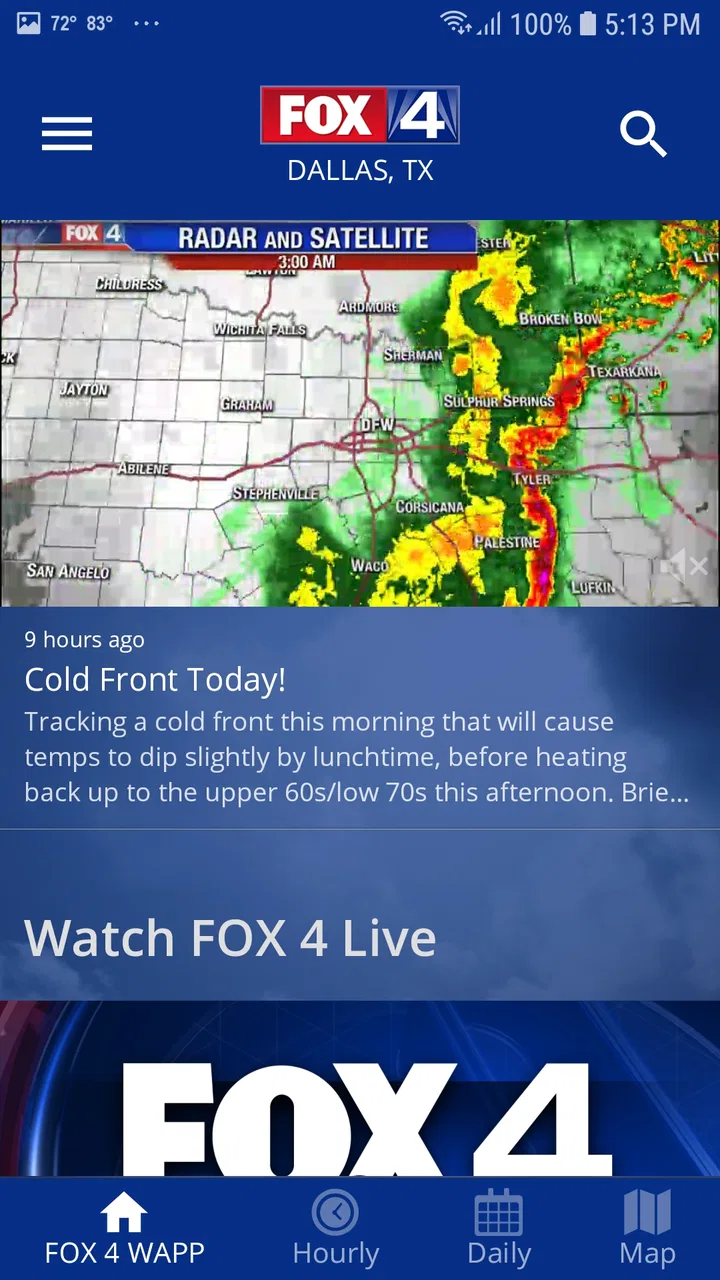
When I need a quick look at conditions in the Dallas–Fort Worth area, I prefer a local weather app that puts the regional forecast and familiar broadcast coverage in one place. That is the role of FOX 4: DFW WAPP - Weather, a free weather app from Fox Television Stations, Inc. I found it most useful when I wanted a fast answer to a practical question: should I leave now, delay a trip, or check the forecast video before making plans?
This is not trying to be an all-purpose weather service for every location on earth. Its identity is much more local. It combines real-time weather information for FOX 4 Dallas with video forecasts, so the experience feels closer to checking a local newsroom than opening a purely data-driven weather dashboard. That focus is its main strength, but it also explains why some users will prefer a broader alternative.
How I use it for an everyday forecast routine
My normal workflow is deliberately simple. I open the app, check the current conditions, look ahead at the forecast, and then decide whether I need more context from the video forecast. That order matters. The immediate information helps with a quick decision, while the video gives the local weather presentation more room to explain changing conditions.
You May Also Like

 Blood Strike: 2.5 Anniversary
Blood Strike’s Loadouts Turn Every Drop Into a Tactical Gamble
A close look at Blood Strike’s custom loadouts: how fast access to signature weapons reshapes its battle royale rhythm, rewards preparation, and narrows the gap between fights.

 Pandora - Music & Podcasts
Pandora’s Music Is Easy to Start, but Harder to Recover
Pandora’s strength is its low-effort path from a seed to a station. Its weak spot is how much confidence it asks you to place in connection, setup, and quiet recovery.

 8 Ball Pool
 Is Built on Rivalries, Rematches, and Routine
A close look at the rivalries, rematches, shared routines, and unanswered safety questions that turn a quick pool match into a persistent mobile community.

 Samsung Music
’s Quiet Strength Is Playing What You Already Own
Its reach comes less from spectacle than from dependable access to a personal library. That simplicity is both the app’s strongest retention engine and its ceiling.

 AccuWeather: Weather Radar
AccuWeather Review: A Quick, Clear Forecast for Everyday Decisions
For everyday plans, the best forecast is the one you can understand quickly. AccuWeather makes rain timing, radar, and local conditions easy to act on, with a few trade-offs.

 Hill Climb Racing
Why Hill Climb Racing Still Turns Crashes Into One More Run
A tiny car, a bumpy hill and one more upgrade: Hill Climb Racing keeps resurfacing because its simple chaos makes every near-miss feel personal.
More From Our News Desk



A realistic example is a weekday morning when I am deciding whether to walk, drive, or leave earlier than usual. Instead of relying only on a temperature number, I use the app to check the broader forecast and then watch the local video when the weather looks unsettled. If rain, wind, or a fast change is part of the day, the video format can be easier to absorb than scanning several small forecast symbols.
I also like the app for checking plans later in the day. Before heading out for errands, I can use the forecast as a first pass and then return to the video when I want the local presentation rather than a bare list of conditions. That repeatable habit keeps the app useful without requiring me to explore every screen on every visit.
The app is free, which removes the biggest barrier to trying it. It is rated for Everyone, and it runs on Android devices using at least version 9 of the operating system. The current release is 6.1.701, so anyone considering installation should still check that their phone meets the operating-system requirement before expecting it to work.
What the local focus changes
Many weather apps treat location as one entry in a huge worldwide database. This one feels more intentional for people who care about the Dallas–Fort Worth area and already recognize FOX 4 as a local source. That does not automatically make every forecast more accurate than another service, but it changes how I consume the information. I am not only checking a number; I am checking a regional weather update presented for the area I care about.
The video component is particularly useful when the forecast needs explanation. A standard hourly row may tell me that conditions change, but a local forecast segment can make the reason and timing easier to understand. I would not watch video for every routine temperature check, though. For a quick glance, the app works best when I stay focused on the immediate forecast view and save the video for days when context matters.
That distinction is one of the first practical trade-offs. Users who want a dense screen packed with radar layers, international locations, and highly customizable charts may find this experience less suitable. Users who want local weather information with a familiar broadcast-style option may appreciate the tighter focus.
Settings I would check before relying on it
My first recommendation is to review the app’s location behavior during setup and decide whether it matches the way you use weather apps. If I am mainly interested in one home area, I want the app to open with that place consistently. If I travel around the region, I need to pay closer attention to whether I am checking the correct location before acting on the forecast.
I also make sure notifications are handled intentionally rather than accepting every prompt automatically. Weather alerts can be valuable, but too many interruptions make people ignore the important ones. I prefer a setup that supports my routine: quick checks when I choose, with attention-grabbing notices reserved for situations where they genuinely help.
Another useful habit is checking video playback before an urgent weather day. I would rather discover a connection problem during an ordinary morning than wait until I am already trying to decide whether to change a commute. Because video is part of the app’s identity, it deserves a separate test from the basic forecast screen.
It is also worth confirming that the app has permission to provide the information you expect from it, while avoiding permissions that do not fit your routine. I do not turn every setting on simply because it is available. My approach is to grant what supports location-based weather use, then revisit the choices if the app does not behave as expected.
Small shortcuts that make repeat checks faster
The fastest pattern I found is to separate “quick check” and “context check” into two different actions. For the quick check, I open the app and read the current forecast without wandering through extra sections. For the context check, I deliberately open the video forecast when the day appears changeable. This prevents the app from becoming a time-consuming ritual while preserving the part that makes it different from a basic weather widget.
I also recommend checking at consistent decision points instead of constantly refreshing. For example, I might look once before leaving home, once before an outdoor appointment, and again if the weather visibly changes. That approach is more practical than repeatedly opening the app without a specific question, and it makes the local video updates easier to use as part of a routine.
When I am planning an outdoor activity, I check the forecast at the time I expect to be outside rather than judging the entire day by the morning conditions. The useful question is not simply whether the day looks good overall; it is whether the conditions fit the particular part of the day that matters to me. This is a basic workflow, but it prevents a common mistake with any weather service.
I would also keep a second weather source available for comparison when the decision has serious consequences. The FOX 4 app is convenient for local awareness, but no single forecast should be treated as an unquestionable guarantee. If I am making a travel, event, or safety decision, I compare the local presentation with another trusted source and use official emergency information when necessary.
Where it works better than common alternatives
Compared with a phone’s built-in weather panel, this app offers a more distinctly local experience and adds video forecasts. A built-in panel is usually better for an instant glance because it is already integrated into the operating system. The FOX 4 app becomes more appealing when I want regional context rather than only a compact temperature and condition icon.
Compared with large national weather apps, its advantage is focus. A national service may offer more locations, more layers, or a wider collection of technical tools. The FOX 4 app is easier to understand if my main concern is the Dallas–Fort Worth forecast and I value local broadcast coverage. I would choose the broader service for extensive travel planning, while I would choose this one for a local routine.
Compared with a television forecast, the app is more convenient because I can check it when I want instead of waiting for a scheduled segment. At the same time, it does not replace the value of a full broadcast when I want a longer explanation of a developing weather pattern. The app sits between a quick mobile forecast and local news coverage, which is exactly why its video feature matters.
Its public reception is mixed but substantial, with an average rating of 3.8 from around 8,700 ratings and roughly 2,600 written reviews. More than 1 million people have installed it, so it is clearly not an obscure experiment. I read those figures as a sign that the app has a real audience, not as proof that every user will find the interface perfect.
Limits experienced users should understand
The local focus can become a limitation if my needs move beyond the app’s natural audience. Someone who frequently changes cities, compares many destinations, or wants a highly technical meteorological workspace may be better served by a national or specialized weather app. I would not install this as my only tool for a long trip across several regions.
The video forecast is helpful, but it is not always the fastest option. If I only need to know whether I should take a jacket, watching a forecast segment may be unnecessary. Experienced use means knowing when to ignore the extra layer and read the forecast directly. The app is strongest when I use video for interpretation, not as a mandatory step for every visit.
Like any app that depends on current information and video delivery, the experience can also be affected by the quality of my connection. I plan around that by checking important conditions before I leave rather than assuming I can always load everything at the last moment. This is a workflow limitation more than a flaw unique to the app, but it matters when timing is important.
I would also avoid treating a local news forecast as a substitute for official emergency instructions. The app can help me understand the weather picture and follow local coverage, but urgent safety decisions require attention to authoritative alerts and instructions. That is especially important when conditions are changing faster than a normal forecast cycle.
Who should install it
I think this app is a good fit for Dallas–Fort Worth residents who want a straightforward local forecast and appreciate video explanations. It is also useful for people who already follow FOX 4 and want a mobile way to check weather information without opening a general news experience. The free price makes it easy to test as a companion to whatever weather tool is already on the phone.
I would recommend it to a commuter who wants a repeatable morning check, a parent planning outdoor activities around the local forecast, or anyone who prefers hearing a forecast explained instead of reading only symbols and numbers. The best results come from using the app with a clear purpose: current conditions for speed, forecast details for planning, and video for local context.
I would skip it as a primary choice if I need worldwide coverage, advanced map analysis, extensive customization, or a single app for many frequently changing destinations. In those cases, a broader weather platform is likely to be more efficient. I would also skip relying on it alone for high-stakes decisions, regardless of how familiar the local coverage feels.
My final assessment after building a routine around it
What I like most is the balance between a practical mobile forecast and the personality of local weather coverage. The app does not need to be overloaded with tools to be useful. When I open it with a specific question, it gives me a focused way to check the Dallas–Fort Worth weather and decide whether a video forecast adds worthwhile context.
My advice is to keep the setup restrained, test the location and notification behavior, and create two habits: a fast forecast check for ordinary decisions and a video check when the weather looks complicated. That combination makes the app more useful than simply installing it and opening every feature at random.
After using it this way, I see FOX 4: DFW WAPP - Weather as a focused local companion rather than a universal replacement for every weather service. Its free access, local orientation, and video forecasts give it a clear reason to exist. The right choice depends on whether local clarity matters more to you than a larger collection of technical tools. For Dallas–Fort Worth users who value that local perspective, I think it is worth trying; for everyone else, a broader alternative may be the better everyday fit.
FAQs for FOX 4: DFW WAPP - Weather
01What features does the FOX 4: DFW WAPP offer?
The FOX 4: DFW WAPP provides users with real-time weather updates, interactive radar maps, and severe weather alerts specifically tailored for the Dallas-Fort Worth area. It also offers detailed forecasts, video updates from local meteorologists, and customizable settings to receive notifications about weather changes in your specific location.
02Can I customize weather alerts on the FOX 4: DFW WAPP?
Yes, the app allows you to customize weather alerts to suit your preferences. You can choose to receive notifications for severe weather events, daily forecasts, and updates for specific areas. This ensures that you are always informed about weather conditions that are relevant to you, without receiving unnecessary alerts.
03Is the FOX 4: DFW WAPP available for both iOS and Android devices?
Absolutely, the FOX 4: DFW WAPP is available for download on both iOS and Android platforms. You can find it on the Apple App Store for iPhones and iPads, and on the Google Play Store for Android devices. The app is designed to function seamlessly on both operating systems, providing a consistent user experience.
04Does the FOX 4: DFW WAPP use a lot of data?
The app is designed to be efficient with data usage. However, interactive radar maps and video content can consume more data compared to basic text updates or forecasts. It's advisable to connect to Wi-Fi when accessing these features extensively, especially if you have limited data on your mobile plan.
05Is the FOX 4: DFW WAPP free to download and use?
Yes, the FOX 4: DFW WAPP is free to download and use. It provides a comprehensive suite of weather tools without requiring any subscription fees. While the app is ad-supported, these ads help keep the app free for all users, ensuring that everyone can access essential weather information without cost.
Pros
- Accurate weather forecasts with real-time updates.
- Interactive radar maps for better planning.
- Customizable alerts for severe weather warnings.
- User-friendly interface with easy navigation.
- Localized news updates keep you informed.
Cons
- Occasional ads can interrupt user experience.
- Requires a stable internet connection.
- Limited customization for radar overlays.
- Some features require location permissions.
- Battery consumption can be higher with GPS on.

FOX 4: DFW WAPP - Weather
Gallery